Friday

Computer Power Supply Unit (SMPS)

SMPS - Switch Mode Power Supply - is the technical term for what we generally know as the computer power supply unit. It is basically a box-like device used for the supply of power to your computer unit. So what does it do? In very simple terms, it converts the AC (Alternating Current) power supply from the general electrical sockets available at your home to DC (Direct Current), basically the type of current you get from a battery. The "Switch" term in the SMPS comes from the fact that the computer power supply unit converts AC to DC using switcher technology. We now use the ATX supply power units for the computers as the industry has settled on a standardized case and motherboard (ATX).

Typically, three voltages (12V, 3.3V and 5V) are supplied by the power supply unit.

If you are selecting a computer power supply unit, how do you go about doing that?

1. The first thing of course is to know what power requirements you are looking at. You can check the power requirements of the various devices of your computer and add them up, or you can just ask the vendor for the same. Once you have the total wattage, (that will be the unit of power), you can go for a slightly higher rated SMPS.
Now why you want to do that is because, at a later point of time, if you want to upgrade your computer, like a new DVD RAM drive, you may need a higher power supply.
One more thing to remember is to check the actual wattage against what the label on the power supply unit indicates.

2. It is always a good idea to go for a branded power supply unit. But that might not help if price is an important criteria.
The SMPS supplies power to all the components of the computer, like the motherboard (24/20 pins), hard drives and CD ROMS etc (IDE 4-pin), floppy drives (Floppy 4-pin), etc.
What happens is that, once the computer is powered on, there is a surge of current and as a result, it gets heated up. The fan, in such a condition is crucial, other wise, high temperatures might result. You should have at least one 80mm fan. It is even better if there are two fans instead of one.
(One such problem is the continuous restart of your computer as the temperature rise due to a faulty power supply causes the computer to shut down without giving any error message, and in some cases, not even the BIOS screen.)

If you have a branded SMPS, you can rest assured that there is not much chance of such an event occurring.

3. Number of connectors and the efficiency rating – These two factors are at par with the other factors while considering the computer power supply unit. The efficiency rating, is important as it is directly related to the heat output and subsequent temperature rise. Higher efficiency rating ensures that the SMPS causes a lesser rise in temperature.
The number of connectors is important as it determines how many devices you can use with your computer.

4. Lastly, the noise level – Apart from the CPU fan, the SMPS fan also determines the amount of noise generated – Except from a fine whirring sound, which is basically indistinguishable, you should not have any other sound coming from the SMPS.

Thursday

How to select a computer motherboard

What is a computer motherboard or a ‘mobo’ anyway? It is the primary circuit board of your computer. It effectively means that it is one of the most important part amongst all the other devices present in your computer. And combined with the CPU (Central processing unit), it is the costliest as well.

So, if you are planning to get a computer assembled and would like to choose each device, how does the motherboard part come into it? That’s because all other parts depend on the motherboard for operation and compatibility with the motherboard is a must for the sound operation of your computer.
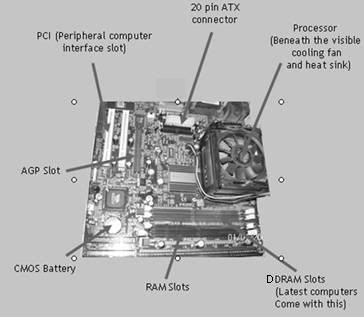
Before we get to selecting a motherboard, let’s get to know it a bit. A computer motherboard broadly consists of the following parts:
1. Processor: This is the part where the computer does its calculations. It is generally hidden behind the heat sink and the cooling fan.

2. Main memory: This is added to the computer motherboard in the slots available (DDRAM slots in the picture).

3. Other Components:·
ATX (Advanced Technology Extended) connector or, rather, the power plug-in for the motherboard·
PCI Slots – These slots are available for adding various components to the motherboard, such as sound cards, Ethernet Card (for LAN), etc·
AGP(Advanced Graphics Port) – For video adapters·
BIOS (Basic Input and Output) – The part responsible for initializing the vital components of the computer when it is turned on – (CMOS battery responsible for the BIOS is shown in the figure.)

Now let’s get to the question of actually selecting a computer motherboard. What features do you want in it?

1. Which processor are you planning to use with it – Check with your vendor whether the motherboard is compatible with the type of processor you want to use with it.

2. FSB (Front Side Bus) or Bus Speed – Check the FSB of the computer. It is the speed at which your computer communicates with the processor as well as with the PCI and the hard drives, although at a slower pace. If the speed of your hard disk is higher than the bus speed, you run the risk of underutilizing your hard disk.

3. Type of chipset – Check the type of motherboard chipset as the motherboard is basically dependent on it for almost all operations.

4. Memory Support – Which type of memory you need – SDRAM, DDRAM or DDR2. Most of the modern motherboards come with a DDR compatibility as it is cheaper and faster.However, check for the number of slots provided, so that you can upgrade the memory later.

5. Does it have an AGP Slot? (Find the AGP in the picture show at the end.) - This is necessary if you plan to use a video card for enhanced graphics performance.

6. How many PCI slots does it have? More number of PCI slots means more flexibility to add components such as sound cards, Ethernet cards etc. Go for a motherboard which has at least three slots.

7. Does it have an inbuilt sound or graphics card? – That means lesser driver conflicts and hence, better performance at lower cost if you are not the game-crazy type.Remember that choosing the motherboard determines the possibilities of up-gradation later. So keep that in mind.

Monday

All promotions starts with Perfect Logo

A logo design is like your company's face to the world. Its purpose is to uniquely identify your company and brand by making an indelible first impression on clients and customers. So if your logo is going to look very inconsistent on your various promotional marketing materials then that's going to be a problem. Reduce this hassle by starting out with an easy to reproduce logo.
Ask your marketing consultant about your logo before you approve it from your designer, because he will think of promotional merchandise and marketing activities for your business before he approves it or more simple is ask your self the following to make sure you have a perfect logo

Here are 5 basic things to consider:
1. What type of image are you going for? Do you want a descriptive logo with images or just a play on words?

2. What basic color would you like to use to represent your business? Will it fit in with your color scheme that is already in place on your web site or in your business correspondence?

3. What is the most important feature of your business that you would quickly like to convey? Is it a product or a service?

4. Do you want a complex or simple logo design? Large corporations like Nike or Target do well with simple, but a new small business might need more to make it memorable since it won't have the huge exposure that the big guys can afford.

5. Do you want your business name to be part of your logo? Small businesses may find this feature more important because of their need for exposure without the capital for large scale advertising services

For more information on promotional products and promotions items please visit www.completepromotionalproducts.com.au

National Candy Cane Day


Today, December 26th is National Candy Cane Day. It's a celebration of the popular holiday candy traditionally eaten during the Christmas season. Much more than a candy, these peppermint red and white canes are symbolic and are used as decorations. But just because the holiday season is over, it doesn't mean that candy canes can't be used during promotions. Christmas in July promotions, or comedic Santa in the Spring events can be enhanced using promotional candy canes. Imprinted with custom messages, they can be included in mailings, or combined with other gifts to drive the theme.

The Benefit of Corporate Holiday Cards in Creating New Connections

Our life is all about connections. In personal lives as well as in the business world, connections with other people are what it is all about. For companies, connections are where the success in business is found. Relationships with customers, with colleagues along with with workers are all essential parts of a successful enterprise. Giving corporate promotional gifts for Xmas and birthday acknowledgements is a great way to create fresh relationships as well as bolster relationships already available. Such greetings can be a simple good will wish for the season or birthday or they may be expressions of gratitude for the person's involvement in the company's good results.
Corporate holiday cards, mailed for Christmas or birthdays to customers, associates as well as staff members are a well known means of keeping in touch with those who work in the business world circles the firm moves in. By giving these items which offer thanks or appreciation as well as wishes of good cheer, organizations get noticed and hopefully potential business relationships also.
Clientele who're presently dealing with the firm will appreciate the sentiments of thanks along with the good wishes for the holiday season or birthday in question.
Other patrons, such as prior clients who receive corporate holiday cards, may be inclined to revisit the company and rekindle business by buying anew the products or services offered by the enterprise that sent those greetings. Being reminded of the quality product or a nicely preformed service through corporate holiday cards is a great way for a past customer to be nudged into coming back.
If potential customers look at the top quality corporate holiday cards with an positive message of good cheer as well as appreciativeness, they'll likely remember that business when they are faced with a need this company can fulfill down the road.
Connections with personnel, clients and associates in the business world are the groundwork of a good, solid enterprise that is profitable. Corporate holiday cards play a small yet vital role in the building and maintaining of relationships between the firm which sends them and also the people that receive the cards. Whenever customers feel appreciated and noticed, they're likely to remember that emotion and support the firm later on. That support might be repeat business interactions or positive word of mouth testimonials to loved ones, buddies and co employees that could result in a lot more sales for the future. Corporate holiday cards are certainly a great investment.

Thursday

Intel Core 2 Duo and Extreme Processors

For a company like Intel to stumble and that too, badly, for the two years prior to the launch of the now runaway hit, the Core 2 Duo has been quite an experience (not to be confused with the P4, Core Duo - whereas the P4 Core Duo could complete three instructions per cycle, the Core 2 Duo can complete 4 – and that is without talking about processing power and efficiency). Especially when the underdogs, AMD had almost overtaken it.

But then, all that has changed with the introduction of the Core 2 Duo and the rest. It was when Intel decided to scrap the Netburst micro-architecture that never reached the potential that Intel believed was possible, and focused on the Pentium M architecture designed by their Israeli team that things started brightening up.


The architecture of the chip is simply known as Core, of which the products include Core 2 Duo and Core 2 Extreme. Both run on an 1066 MHz FSB bus and are built using 65nm transistors. Again, both are dual core chips, with the Core 2 Extreme coming with a higher cache and a higher clock speed. (There is also a workstation version of the Core architecture – Woodcrest Xeon.)

These processors are built on a 143 sq mm die and are made up of 291 million transistors, regardless of their L2 cache size. While rivals AMD use 90nm tranistors on their chips, Intel uses the 65nm ones.

Code named ‘Conroe’, Intel’s Core 2 Duo will have a mobile counterpart, named ‘Merom’.
Following are the various versions of the Core 2 Duo that are available.


Testing by PC World and others show that the Core 2 Duo processors are the fastest amongst the range considered for the desktop PCs. (Of course, we haven’t talked about the Quad Core ‘Kentsfield’ series from Intel – consisting of two Conroe chips.)

Apart from that, the Core 2 Duo series boasts of lower power consumption, resulting in lesser heat and higher performance.

Of course, the disadvantage is that you cannot use the processors on your existing motherboards as these processors - though they sit on the same Socket 775 interface as with the earlier Pentium 4 sockets – require different chipsets. Major manufacturers are ready with their motherboards which can use these Intel powerhouses, e.g. Gigabyte, ATI, nVIdia.

While it is difficult to say that whether investing in a Core 2 Duo motherboard makes sense in terms of longevity and it is known that the processor is incompatible with a lot of Pentium-compatible chipsets, it depends on the customer to make the call.

Tuesday

Processor Slots

These are used to attach the Microprocessor or Main Processor to the Motherboard. Mainly, there are three types of slots are available. (a) Pin Type Slot (b) Slot One (c) Socket Type.


(a) Pin Type Slot : This slot is used from the 80286 Stage to Pentium 4 Stage. This slot is in White Color with Holes for Processor. The holes of the slot are according to the processor type. In this slot we can attach Microprocessor and Heatsink with Fan.


(b) Slot One : This Slot is introduced in Pentium II Stage, and used till Pentium III 600 Mhz., Stage. The Slot is in Brown Color, looks like a Big PCI Slot. In this slot, we can attach Processor along with the Heat Sink and Fan.


(c) Socket Type : This is the Latest Slot which are used to attach Pentium D, Dual Core, Core 2 Duo and Quad Core Processors. It is introduced from Intel 915 Chipset Motherboards and still is in use with Intel 945, Intel 965 and later Motherboards. Oppositely to the Pin Type Slot, this slot is having Pins to attach the Processor.